What’s new

We ship every week. Here is the latest.

Every release is written up for the people who use it: what changed, what it was like before, and why it matters. Customers receive the full notes, including fixes and admin steps.

inflooens 5.3.0 · released · 14 updates

Closer to your partners, in step with Encompass

Lending runs on relationships and on getting the details right. In 5.3.0, loan officers can keep the people behind every referral partner in view, and credit the partner who sent each borrower. Processors review each document once, and Encompass records the same decision. A returning borrower is recognized however their number was typed.

  • Loan officers

    Keep the people behind every partner in view

  • Processors and underwriters

    Review each document once

  • Loan officers

    Credit the partner who sent the borrower

  • Everyone who writes templates

    Write templates in a modern editor

For loan officers

5 updates

Keep the people behind every partner in view

A partner’s family, pets and upcoming birthdays now live on their Overview, ready before the call starts.

Before
There was nowhere in inflooens to keep the personal details that build a partner relationship: their family, their pets, the birthday coming up.
Now
Partner Overview has a Household section for a partner’s people and pets. Upcoming birthdays show at the top of the partner view, each with Draft with Luna to write the note for you.
Why it matters
You remember what matters to your partners, and you reach out at the right moment.

Built with care: for anyone under 18, inflooens does not keep a phone number, email, school, workplace or occupation. Luna sees only what it needs to draft a note.
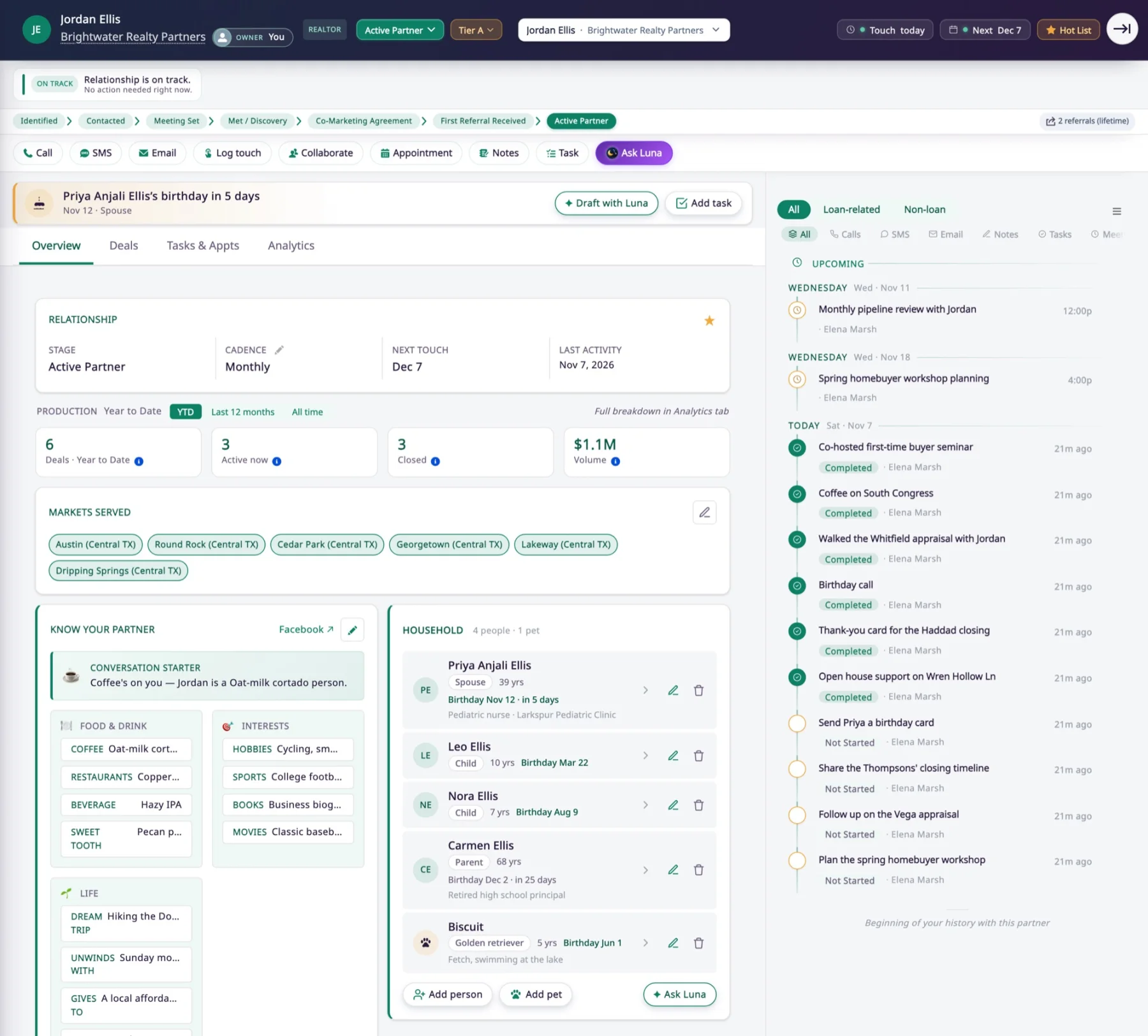
A buyer’s agent’s Overview in Partner Hub. A birthday reminder with Draft with Luna sits at the top, and the Household section lists his spouse, two children, his mother and the family dog.
Demo data · real screen

Credit the partner who sent the borrower

Choose the referral partner while you create a lead, and the credit goes where it belongs.

Before
Quick Create and Guided Create Lead had no place to record who referred the borrower, and choosing a realtor on the lead also made that realtor the referral partner.
Now
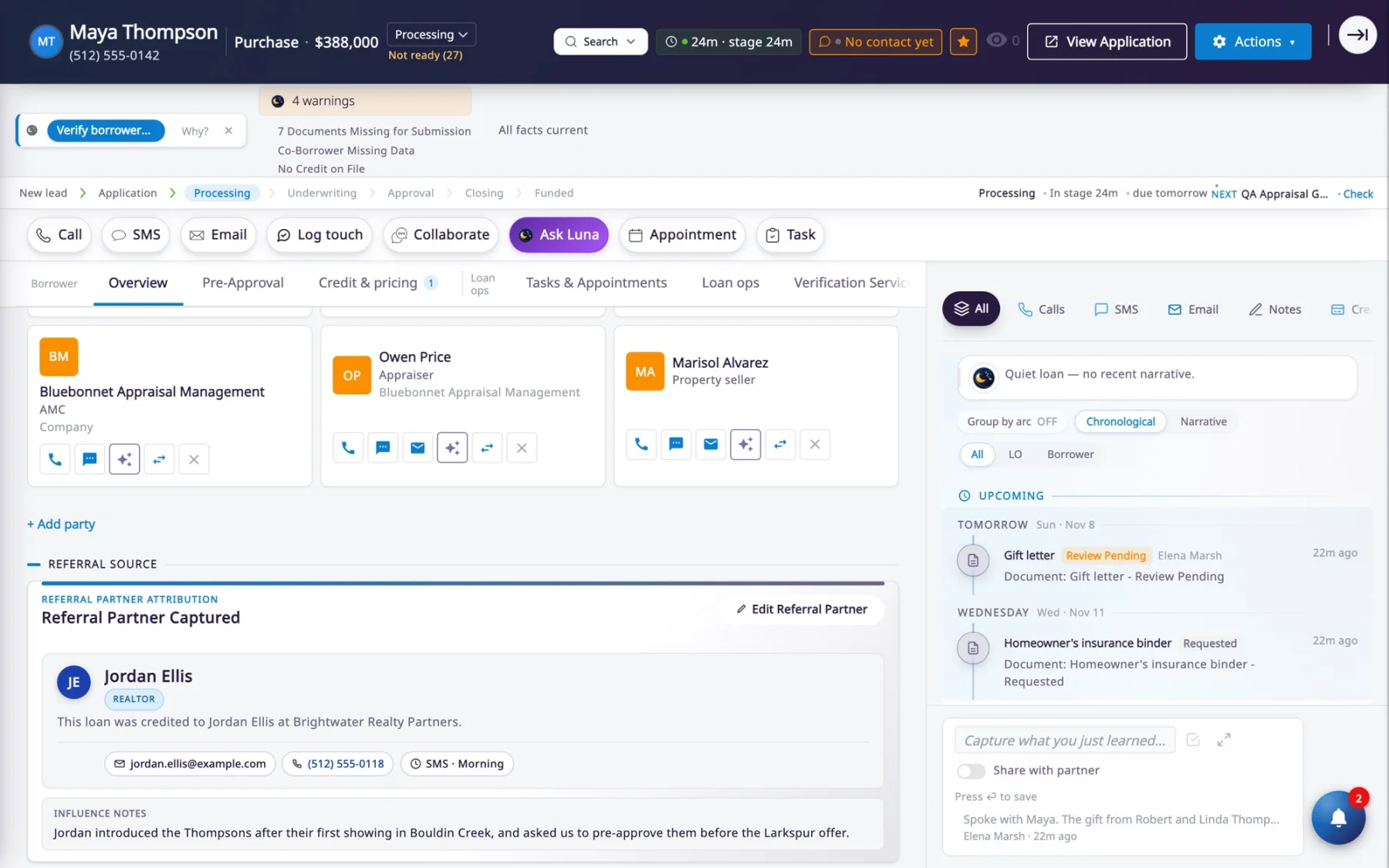
While you create a lead, you choose the referral partner: the realtor you selected, a realtor you just added, or any other partner. It shows on the loan’s Referral Partner card.
Why it matters
Referral credit goes to the partner who actually sent the borrower.
The Referral Source section of a loan’s Overview, crediting the buyer’s agent and his brokerage as the referral partner, with a note on how the introduction happened.
Demo data · real screen

Write templates in a modern editor

The email you are writing sits at the center of the screen, and merge fields are suggested as you type.

Before
You edited a template’s text in a narrow side panel, away from the email itself, and inserting a merge field meant searching one long, ungrouped list.
Now
The email fills the center of the screen. Merge fields are suggested as you type, and the template list filters by channel: email, text message or notification.
Why it matters
Templates are faster to write and easier to get right.
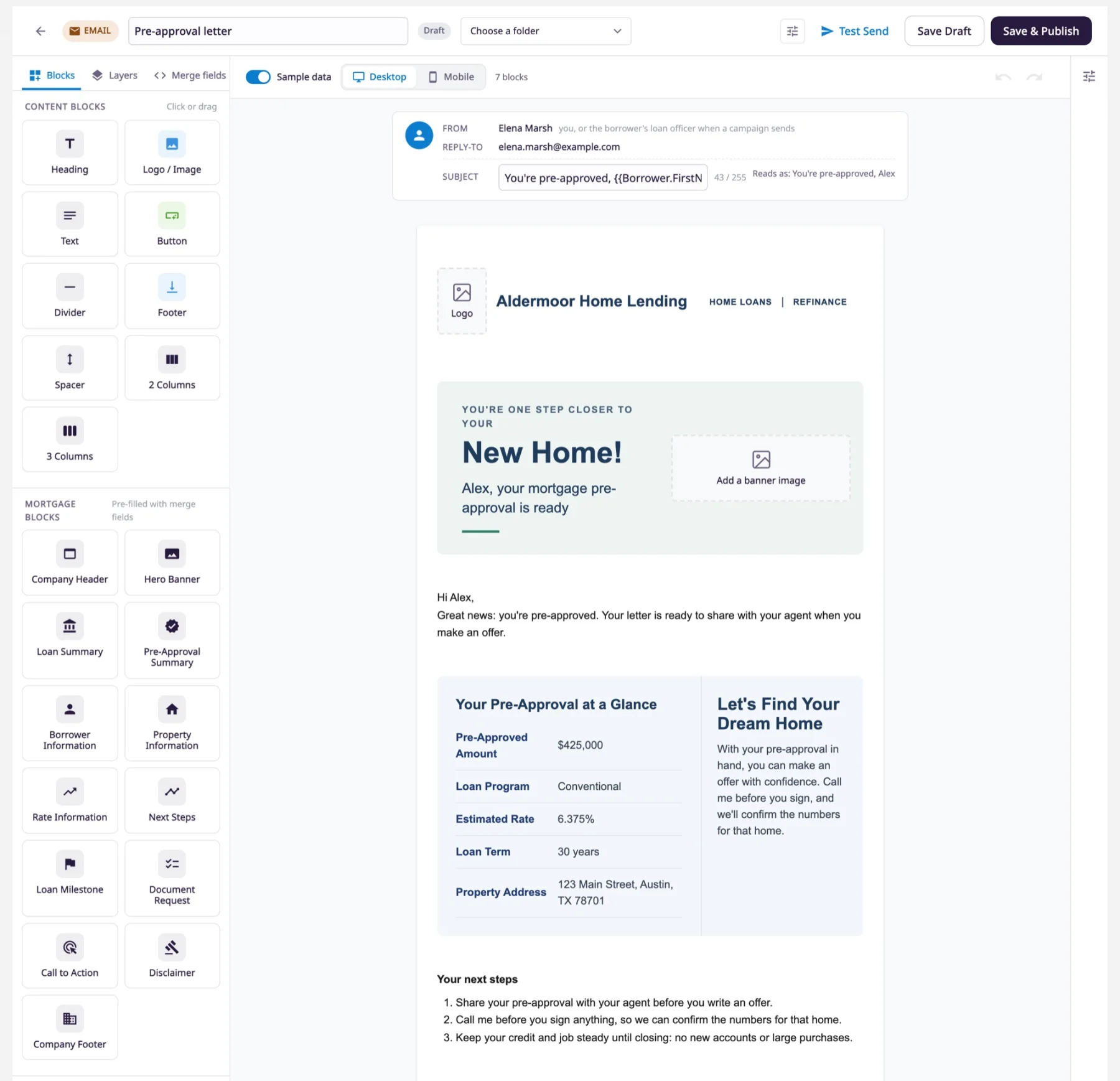
The redesigned template editor with a pre-approval email open. Content and mortgage blocks sit on the left, and the email, shown with sample data, fills the center.
Demo data · real screen

Recognize every returning borrower

Borrower mobile numbers are saved in one format, so a returning borrower is found whichever way their number was typed.

Before
A number typed as 6025551234 in one place and (602) 555-1234 in another looked like two different people, so a returning borrower could become a second client.
Now
Mobile numbers are saved in one format, and the duplicate check, calls, texting and search all use it.
Why it matters
One person, one client record, and calls and texts reach the right borrower.

See exactly what a lead source sent

Each lead from a lead source carries one note that shows what the source sent and how each value was saved.

Before
When a new lead had a blank field, you could not tell whether the source never sent it or the value did not fit.
Now
The note sits in Notes and on the timeline. When a value is not on the loan, the note says what it was and why.
Why it matters
No more guessing why a field is blank.
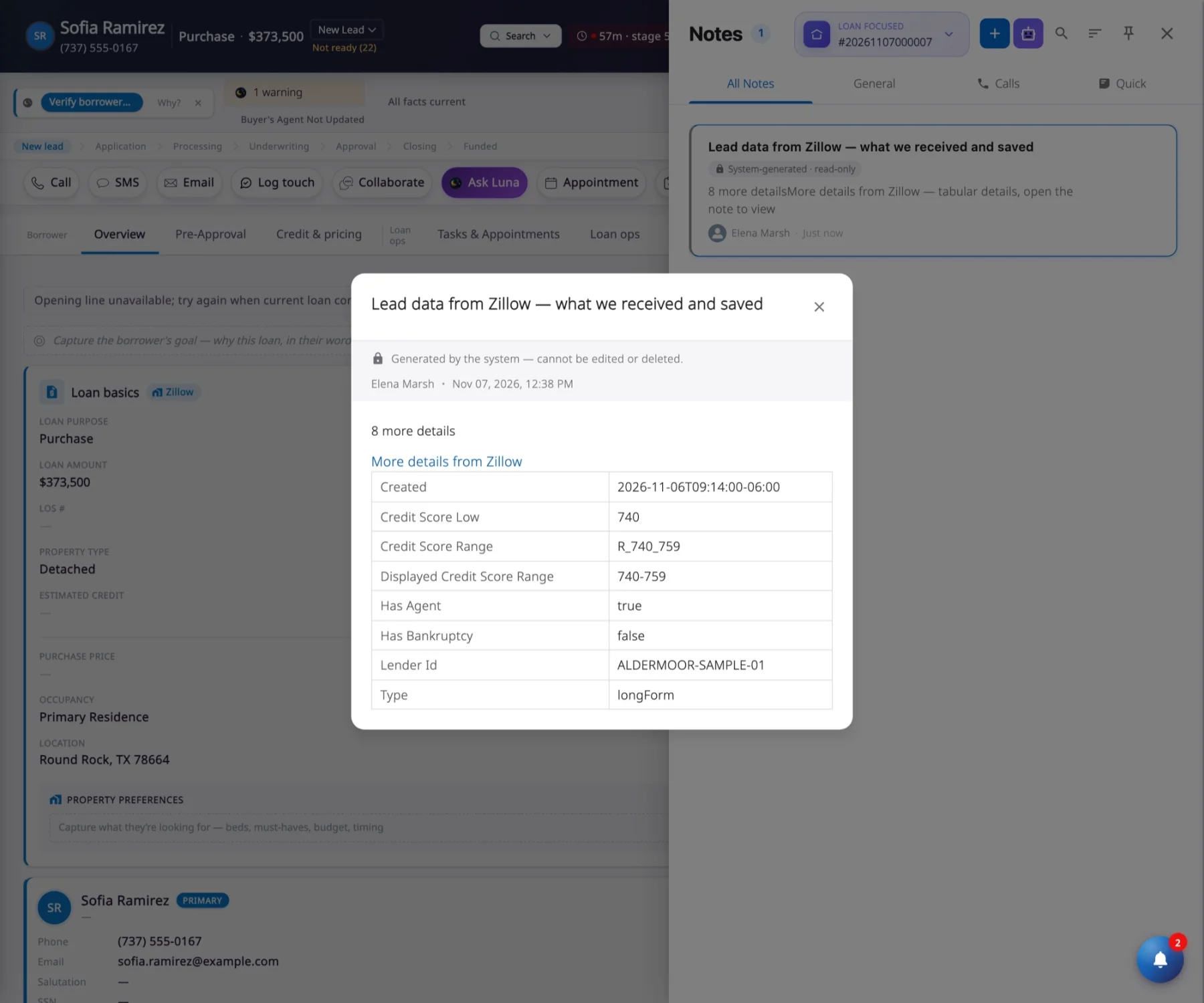
A new lead from Zillow with its system-generated, read-only note open, listing the details the source sent.
Demo data · real screen

For processors and underwriters

2 updates

Review each document once

A review in inflooens reaches Encompass, and a review in Encompass shows in inflooens.

Before
A document reviewed in inflooens still looked unreviewed in Encompass, so files were reviewed twice.
Now
Accepting a document marks it Reviewed in Encompass at the next sync. Rejecting it marks it Re-requested, with your reason as a comment. Reviews recorded in Encompass show in inflooens.
Why it matters
Each file is reviewed once, and both systems agree.
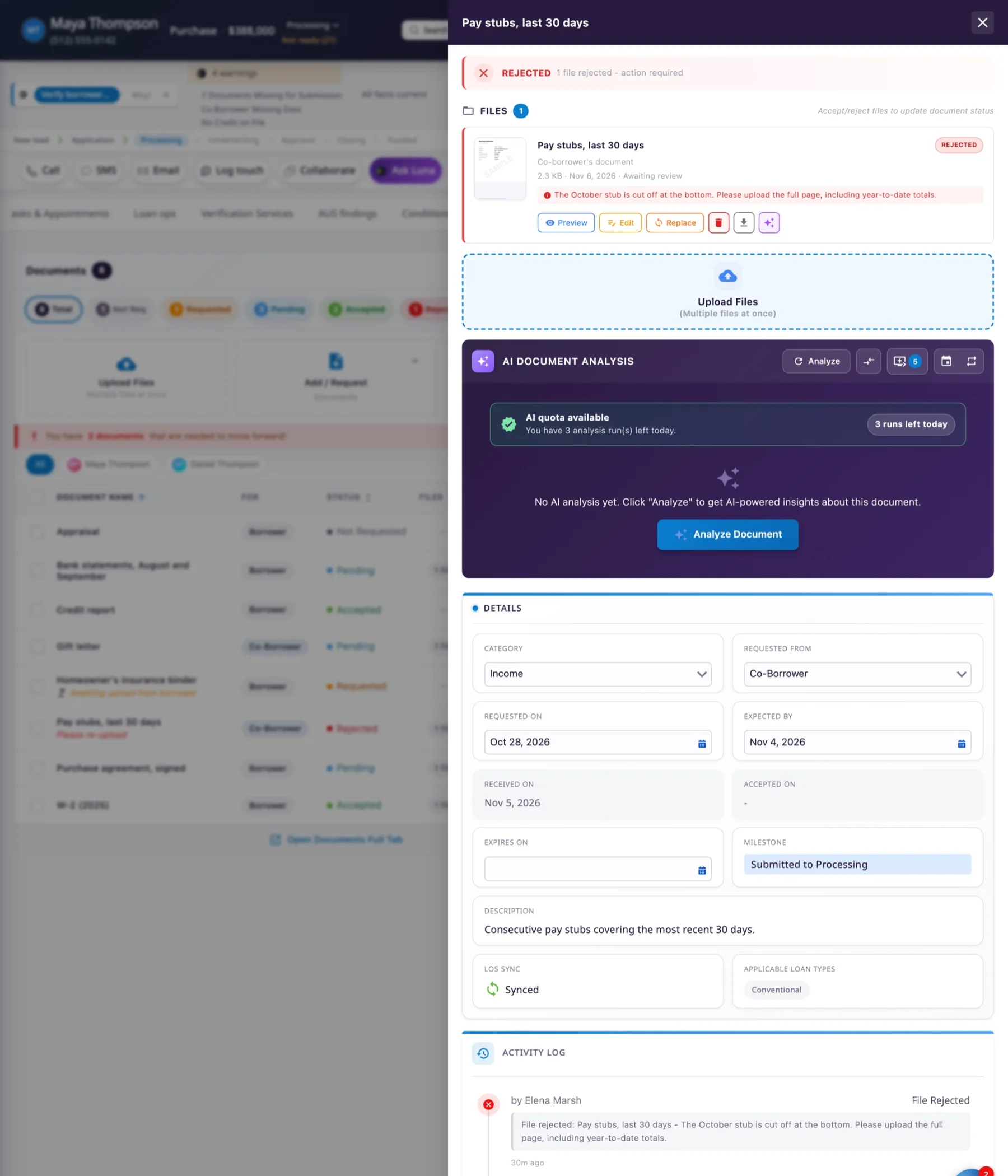
A rejected pay stub, with the reason the borrower will read and LOS Sync showing Synced. The activity log records who rejected it and why.
Demo data · real screen

Files from Encompass wait for your review

Files that arrive from Encompass show as Pending, so you can see at a glance what still needs a look.

Before
Files received from Encompass arrived marked Accepted, before anyone had looked at them.
Now
They arrive as Pending, and the loan timeline shows them as Review Pending. Files someone has already accepted or rejected keep their status.
Why it matters
Nothing is accepted unseen, and your queue shows what is really left.
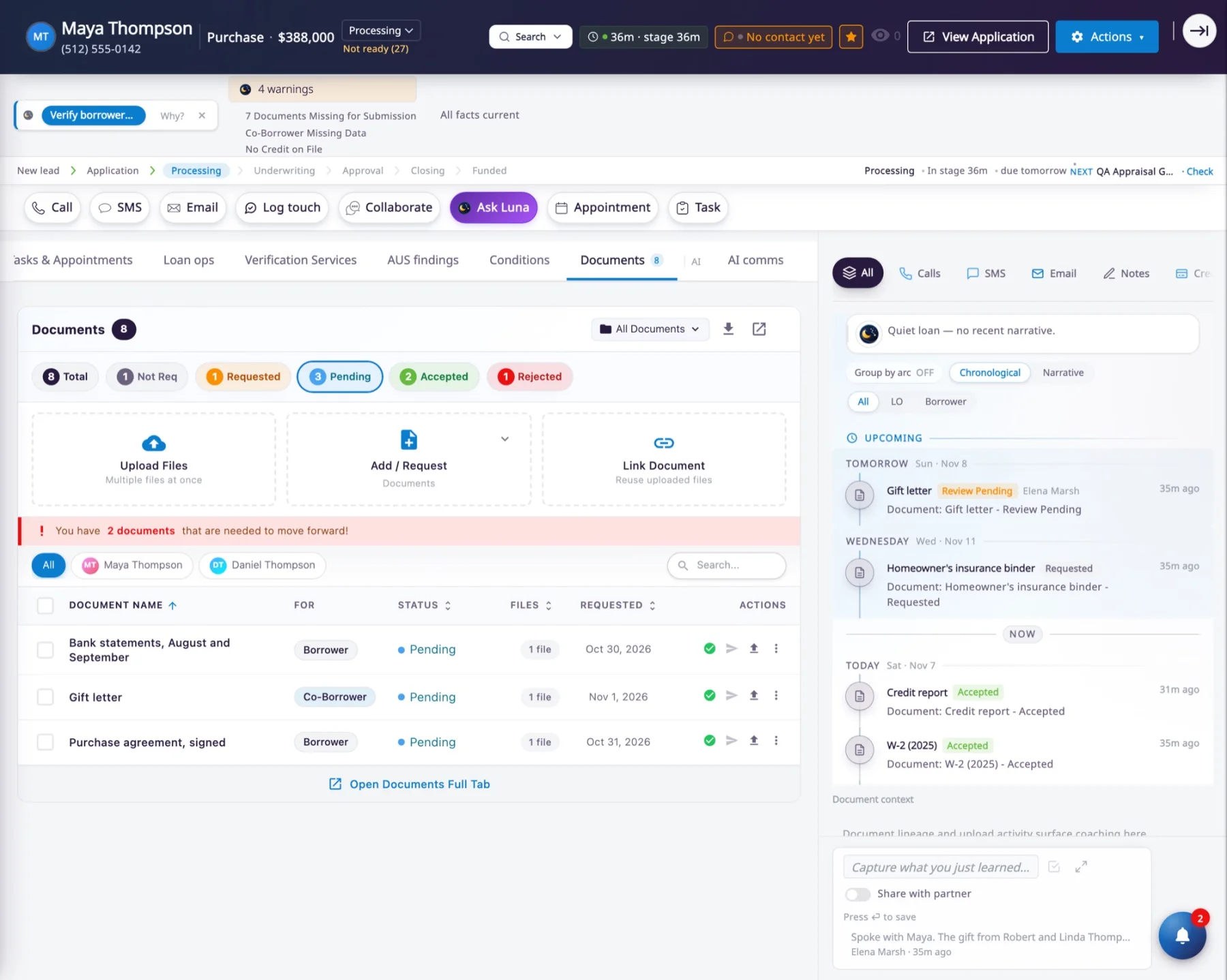
A loan’s Documents tab filtered to Pending: bank statements, a gift letter and a signed purchase agreement, each waiting for review.
Demo data · real screen

For lender admins

4 updates

Keep Salesforce storage lean after loans fund

Files on loans funded more than 30 days ago are cleared from Salesforce storage once Encompass holds the same file.

Before
Every file on every closed loan stayed in Salesforce file storage, even when Encompass already held the same file.
Now
Each night, inflooens removes the file from long-funded loans, but only when it can confirm that Encompass holds that exact file. The document stays on the loan, marked Retained in Encompass. Nothing is deleted in Encompass.
Why it matters
Salesforce file storage stops growing with every funded loan.

On by default. Your admin can turn it off or change the days and milestones.

Put the facts your teams need on the loan card

The Loan basics card can now show fields from the loan’s application, credit pull, rate lock, loan details and pre-qualification.

Before
The Loan basics card could show fields only from the loan, the property and the borrower.
Now
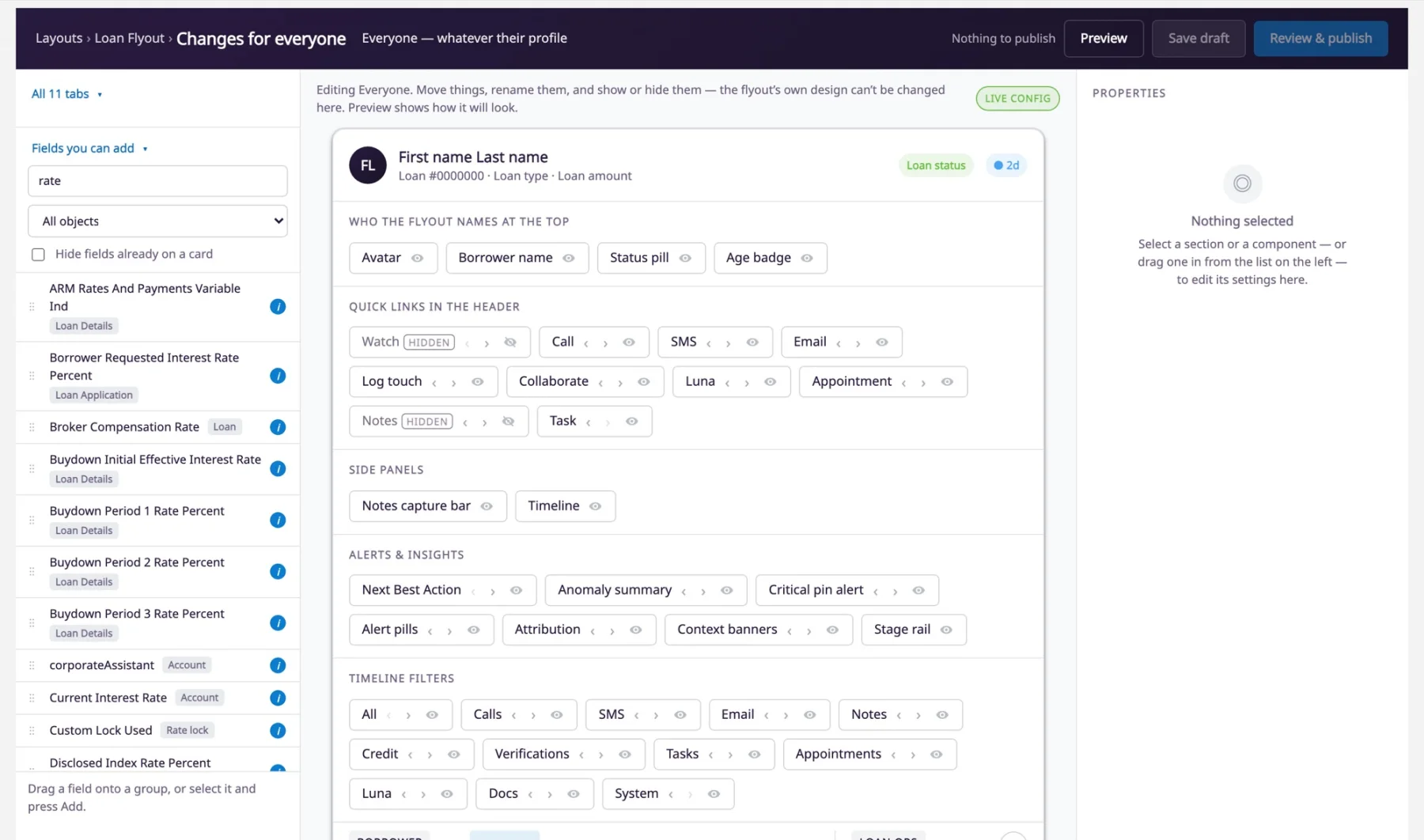
A Fields you can add panel lists every field the loan view can show, in one searchable place. Drag a field onto its group, or select it and choose Add.
Why it matters
Each team sees the facts it needs on the first screen.
Config Studio for the loan view. Fields you can add is searched for “rate” and lists matching fields, each ready to drag onto the card.
Demo data · real screen

Edit disclosures where they print

Edit your disclosure right on the sample letter and see the result as you type.

Before
Disclosure text was edited apart from the letter it prints on, so you could not see the result as you typed.
Now
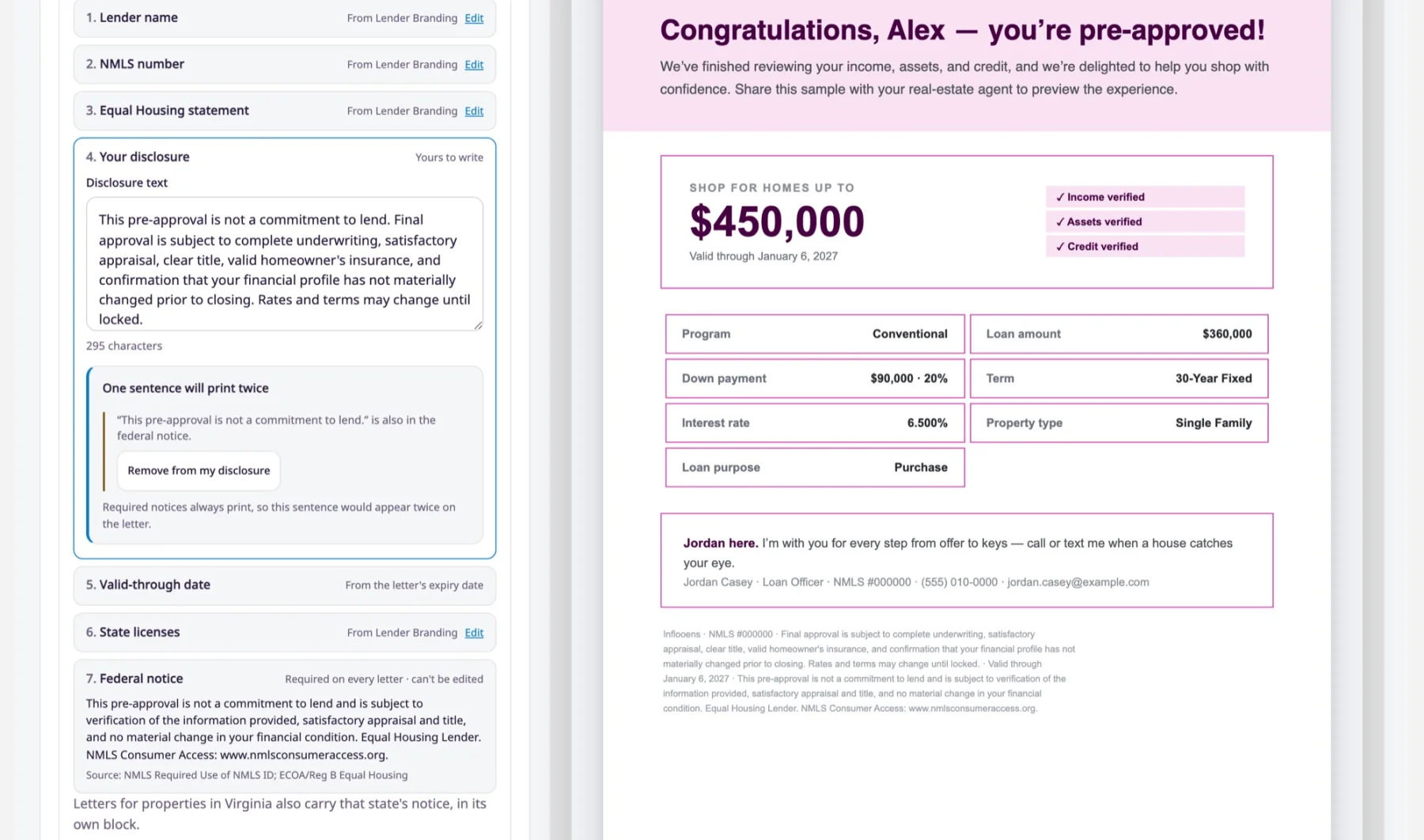
In Letter Studio’s Disclosures tab, you edit the disclosure where it prints. Each footer part says where it comes from, and a sentence that would print twice can be removed with one click.
Why it matters
What you approve is exactly what prints.
Letter Studio’s Disclosures tab. The disclosure is edited beside the sample pre-approval letter, and a sentence that would print twice is flagged.
Demo data · real screen

Lead sources map more for you

More of each vendor’s fields are mapped for you, and leads arrive with the right values in the right fields.

Before
Adding a lead source left more of the vendor’s fields to map by hand, and vendor answers such as “refinance” or “true” did not match the values on your application.
Now
More fields are mapped when you add a lead source, and common vendor answers are saved as the values your loan officers see. A value with no matching field goes to the lead’s note.
Why it matters
Less setup, and loan officers start with complete, correct leads.

For borrowers

3 updates

Upload a co-borrower’s documents where they belong

Borrowers can upload their co-borrower’s pay stubs, W-2s and statements from the co-borrower’s own income and finances cards.

Before
A co-borrower’s documents could not be uploaded from the co-borrower’s own income and finances cards.
Now
When a borrower enters their co-borrower’s details, each document is uploaded on the co-borrower’s card, and Luna fills the co-borrower’s answers, never the borrower’s.
Why it matters
Each document lands on the right person, and the application stays accurate.

The Borrower Hub reads fully in Spanish

Borrowers who choose Español see their whole Hub in Spanish.

Before
Parts of the Hub stayed in English for borrowers who chose Español.
Now
The home page, loan status, next step, to-dos, loan team card and co-borrower progress all read in Spanish.
Why it matters
Spanish-speaking borrowers follow their loan with confidence.

One clear status after submitting

After submitting, borrowers see one status everywhere: “Application submitted”.

Before
The header, overview, progress steps and timeline could each describe a submitted application differently.
Now
All four say “Application submitted”, with one expected time for the current step.
Why it matters
Borrowers always know where they stand.

Earlier releases

Keep every loan moving5.2.0 · · 26 updates

Lending slows when people, documents, calendars and messages fall out of step. In 5.2.0, loan parties follow the loan into Encompass, one note can keep the buyer’s agent informed, and borrowers can return requested documents through their verified Borrower Hub links. Scheduling reads each user’s calendar live, mailbox connections fail clearly when setup is incomplete, and administrators can see and control whether marketing email is ready to send.

  • Keep loan parties in step with Encompass. Both systems name the same people, and missing-contact refusals can be resolved without leaving the loan.
  • Share one update with the buyer’s agent. The team and the buyer’s agent work from the same update.
  • See every accessible loan for this borrower. A returning borrower’s history is visible before another loan is started.
  • Keep one client record for a returning co-borrower. One person keeps one client record and one loan history.
  • Put the right loan originator on the URLA. The application identifies the person who originates the loan.
  • Open the borrower-link workflow from Order LE. You can open the existing Send POS Link steps directly from Order LE.
  • Get requested documents back through Borrower Hub. Requested files return through the loan’s Hub however the loan was created.
  • See which applicant each document is for. Staff can request, review and follow up on the right person’s document.
  • Ask each applicant only for their own documents. Fewer incorrect requests and a clearer file for review.
  • Show borrower conditions only after they are requested. Borrowers see an intentional request, not internal work in progress.
  • Keep two-borrower credit on the right person. The credit picture and DTI are based on the right applicant.
  • Wait for the bank report before showing asset results. The asset results a processor reviews come from the bank’s report.
  • Trust calendars and mailbox connections. Available time is reliable, and email never silently falls back to a shared address.
  • Find email setup and policy settings. Administrators can go directly to the setup check or policy they need.
  • See what marketing email needs. Administrators can correct the right prerequisite before marketing is enabled.
  • Pause marketing email company-wide. Administrators can control marketing delivery without losing queued messages.
  • Give every marketing email a working unsubscribe. Marketing sends have a consistent opt-out path and compliance identity.
  • Work in Campaign Studio on one page. Campaign status and setup are easier to scan and manage.
  • Share notes with the borrower. Borrowers can read the updates their loan team chooses to share.
  • Hide Encompass-only documents from Borrower Hub. Internal documents such as credit, appraisal or fraud reports stay out of the borrower’s view unless requested.
  • Map more lead-source fields during setup. Lead setup takes less manual mapping, and a single bad value no longer loses the lead.
  • Keep gifts and properties without overwriting them. Borrowers can review their finances without damaging work already on the loan.
  • Edit income and finances from Review. Borrowers can correct an answer at the Review step.
  • Record monthly rent for a previous address. The URLA carries the rent a borrower paid at a previous address.
  • Warn about a document that looks wrong. Borrowers and staff both see a possible mix-up, and no file is turned away automatically.
  • Read messages grouped by day. A longer conversation is easier to follow.
The application and the loan file agree5.0.0 · · 17 updates

This release makes the borrower application and the loan file agree in both directions.

  • See who owns a partner, right on the Partner Flyout. You know whose partner it is before you reach out, so two loan officers don’t contact the same agent without knowing.
  • Dormant means the partner has gone quiet, and a reset to Active sticks. The Dormant list shows the partners who have actually gone quiet, so follow-up time goes where it is needed.
  • A returning borrower from the same lead source doesn’t create a duplicate loan. A cleaner pipeline, and borrowers aren’t contacted twice about the same request.
  • Every loan records the channel it came in through. Reliable reporting on where your business actually comes from.
  • Log a conversation that happened outside the platform. Last Touch stays current, so a colleague doesn’t reach out again without knowing.
  • Every loan you process is in My Operations Pipeline. You can work your whole queue from one tab, and managers can see the team’s real workload.
  • Role tasks reach the person who holds the role on the loan. Closing and underwriting tasks reach the people who must do them.
  • Review a returned employment verification field by field. You keep what the provider got right and fix what it got wrong without re-keying the employer, and the file shows which values came from a third party.
  • Letter Studio keeps the letter in view while you design it. You can watch the letter change as you edit, so there are fewer mistakes on the document borrowers and agents see.
  • Spanish pre-approval letters are your choice. Spanish letters go out only when you have turned them on for the brand.
  • Choose whether the loan officer photo prints on pre-approval letters. Each brand decides whether its letters carry the loan officer’s photo.
  • Templates you create can be used in campaigns. The templates you write are available in the places you chose to send them from.
  • SMS templates: emoji, links and a preview of what the borrower receives. Authors see what the borrower will receive, and how many segments it uses, before the text goes out.
  • Campaign email can reach partners and sign as your brand. Partners receive your campaign emails, signed the way you choose.
  • Notification builder starts from records that can send a notification. Building a notification starts from choices that work.
  • A Team Notifications tab for managers. Managers have a direct way to their team’s notifications.
  • The application and the loan file agree, for the borrower and the co-borrower. Borrowers fill in fewer blanks, and their answers reach the URLA accurately.

See it on a real loan.

Thirty minutes. Your scenario. A live file.