Partner Hub and Company Hub
Your LOS tracks loans. This tracks the relationships that create them.
In a purchase market, the referral relationship is the pipeline. Most lenders manage it in spreadsheets and loan officers’ inboxes. Partner Hub and Company Hub put every partner, every company and every referral on the same record as the loan.
Live today Partner HubIn preview Company Hub
Partner Hub
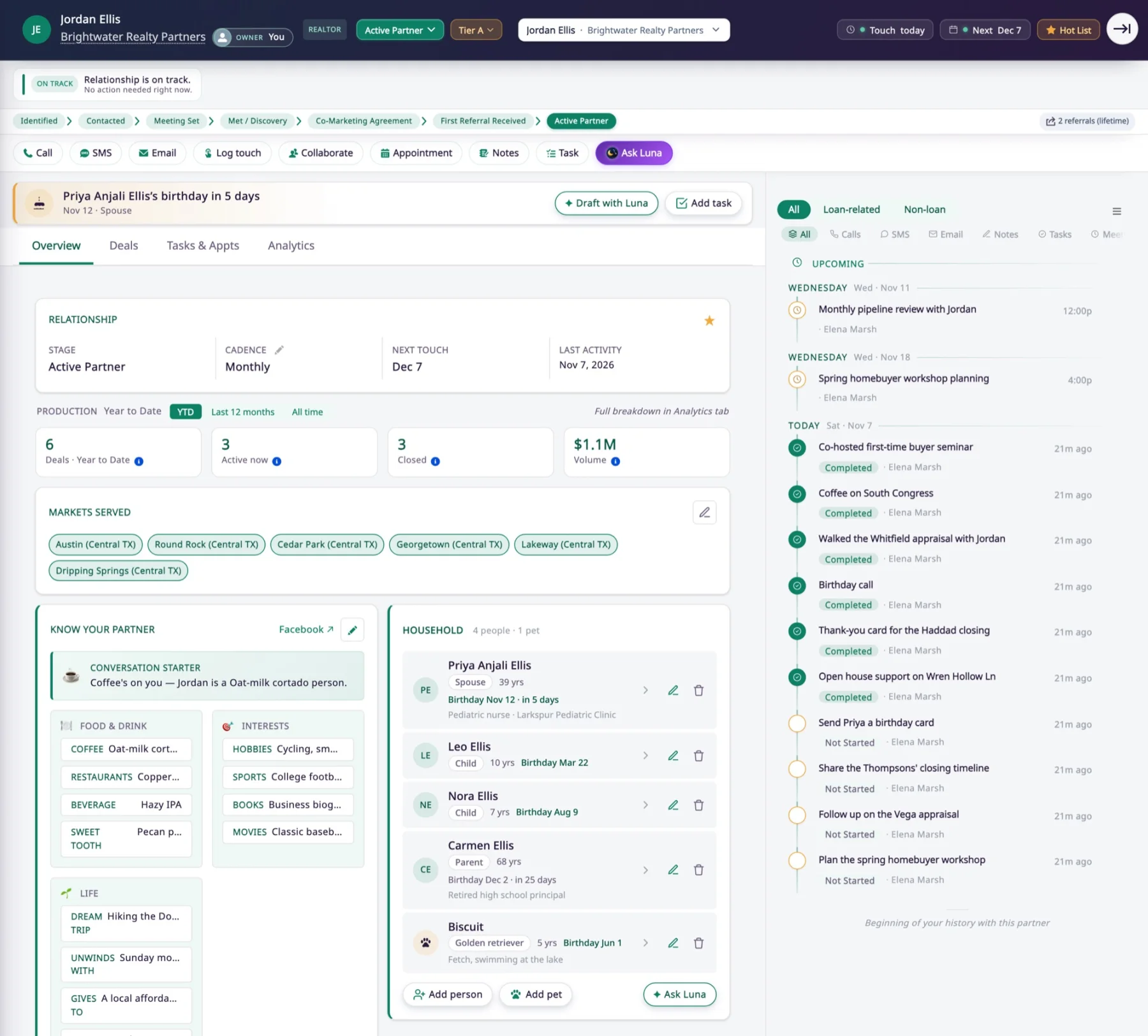
Keep the people behind every partner in view
A partner’s overview shows the stage of the relationship, the cadence you agreed, production to date and the markets they serve. Every call, coffee and closing is on the timeline beside it.
The household section holds the partner’s family, pets and birthdays. An upcoming birthday shows at the top, with Draft with Luna to write the note. Luna AI drafts it without seeing the family’s contact details.
Built with care: for anyone under 18, inflooens does not keep a phone number, email, school, workplace or occupation.
On the loan
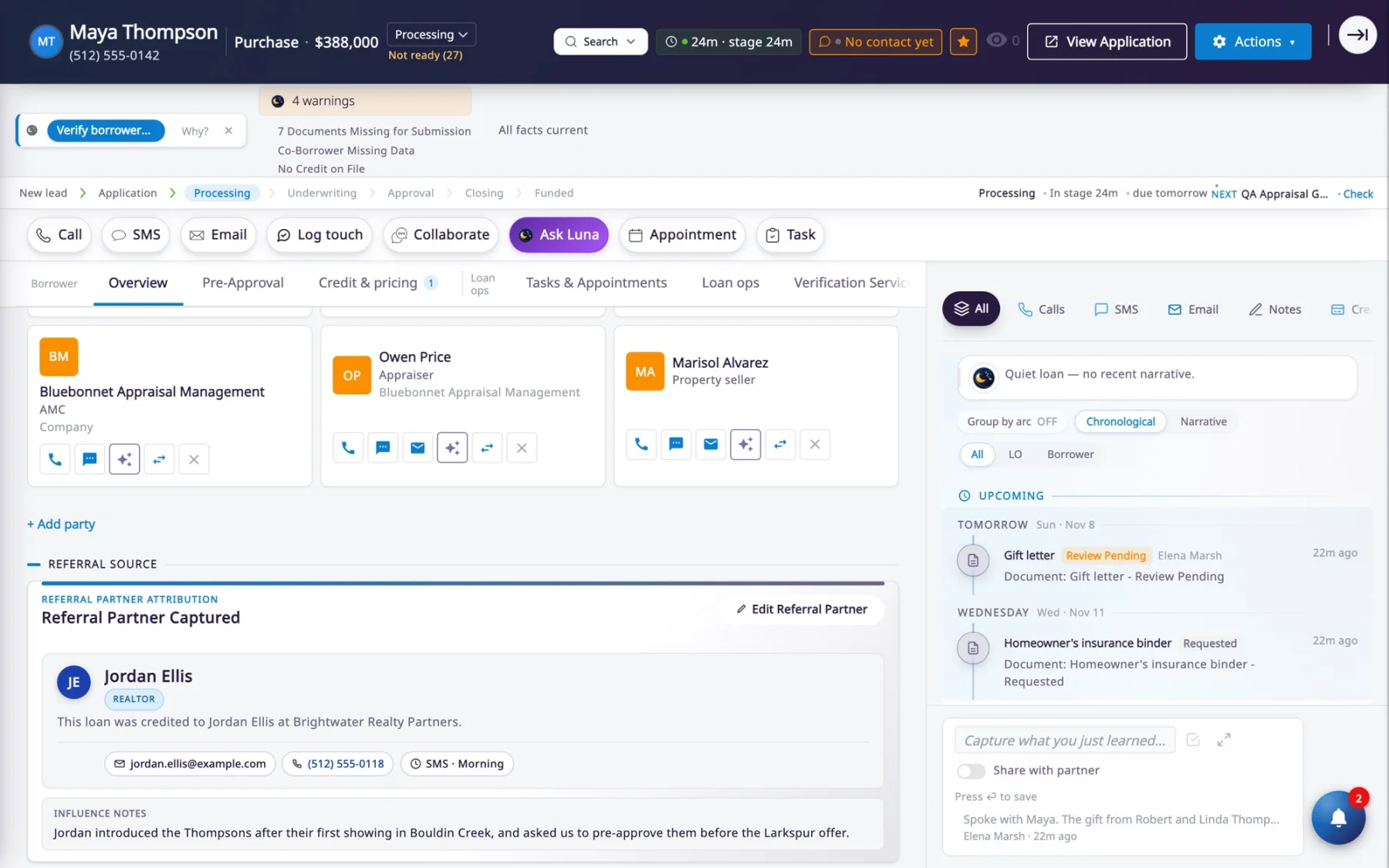
Credit the partner who sent the borrower
The loan officer chooses the referral partner while creating the lead: the agent on the deal, an agent just added, or any other partner.
The credit shows on the loan, with a note on how the introduction happened. Referral credit goes to the partner who actually sent the borrower.
The partner’s own view
The agent follows the loan they sent
Partner Hub is the lender’s side of the relationship. The real estate agent app is the partner’s side: the same loans, showing where each one stands, its key dates and the pre-approval letter.
Rolling out The real estate agent app.All three mobile apps
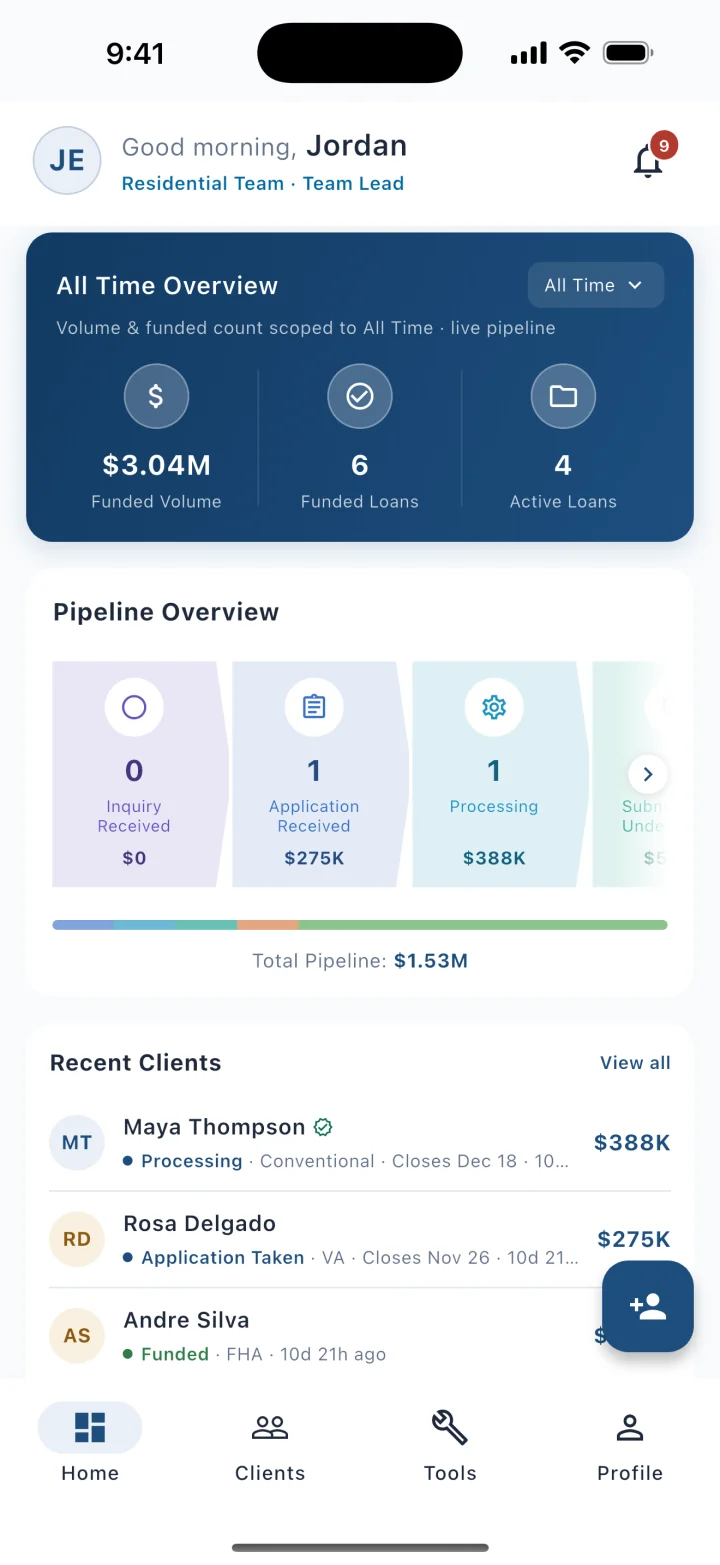
The agent’s home: volume, pipeline and recent clients 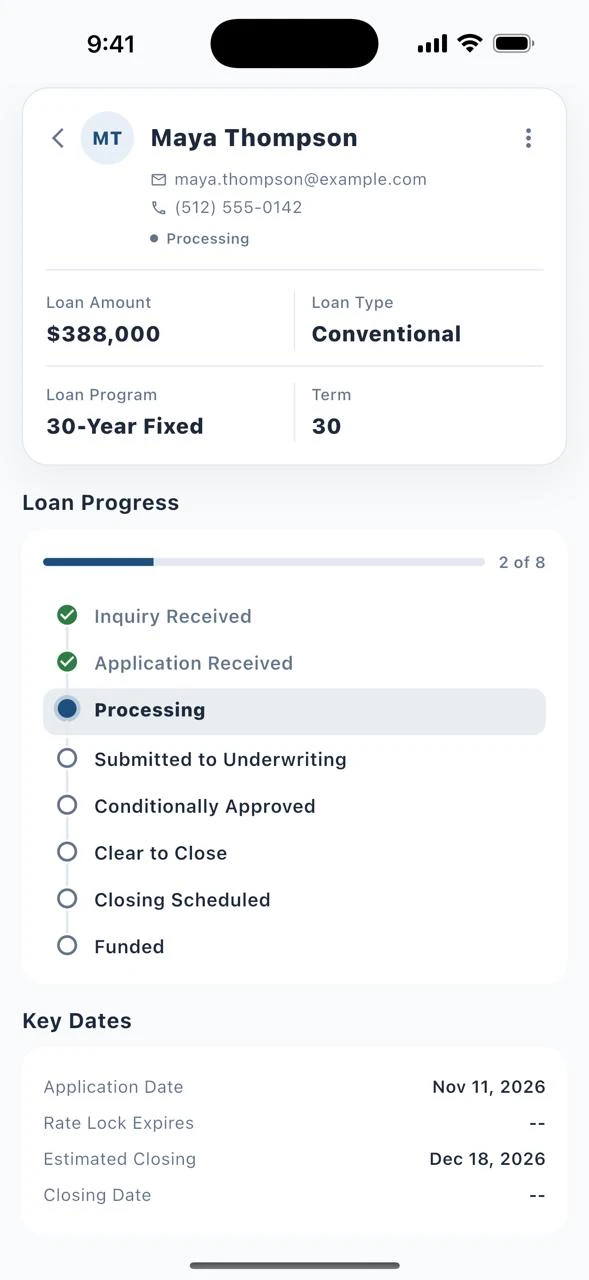
One client: loan progress and key dates 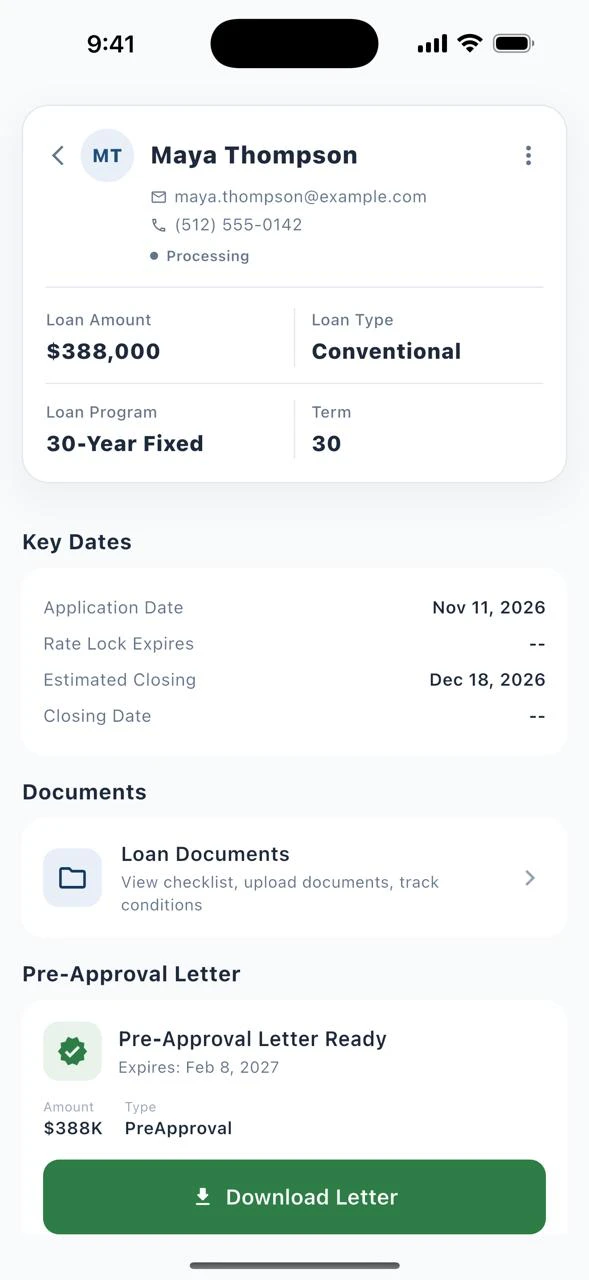
The pre-approval letter, ready to download
Demo data, real screens
What is in it
Partners, companies and referrals, on one record
A partner is not a row in a side database. The agent who sent the loan sits on that loan, next to the borrowers and the loan team.
Partner Hub
Live todayEvery referral partner
Each partner’s owner, stage, timeline, deals, production and tasks in one view, next to the loans they sent.Company Hub
In previewEvery referring company
Brokerages, builders and other partner firms, each with its offices, teams, agents and production figures.Partner record
Stage, tier and cadence
Where the relationship stands, how often you plan to be in touch, when the next touch is due and when you last spoke.Partner record
Notes shared with the agent
A loan officer can share a loan note with the buyer’s agent, so the agent hears it from the loan and not from a separate email.Mobile
Rolling outApp for agents and partners
Real estate agents get milestone notifications, read shared notes and request pre-approvals. That means fewer “any update?” calls.Marketing
Partner campaigns
Campaign Studio runs campaigns for partners from the same record your loan officers use.
For leaders
Own the relationships that feed your pipeline
When a loan officer leaves, the partner history should not leave with them. And a quiet partner should be noticed before the referrals stop.
- Live today
Spot a relationship going quiet
A partner who stops responding is marked dormant after a set window, and returns to active on any real contact. - Live today
Keep the relationships
Partners, their history and their referral credit stay on the lender’s record, not in a loan officer’s personal CRM or inbox. - In preview
See production by firm
Company Hub adds the firm-level view: funded referrals by firm and by office, and which firms are rising, slipping or going quiet.
Straight answers
Questions about Partner Hub
- What is the difference between Partner Hub and Company Hub?
- Partner Hub is about the individual referral partner, such as a real estate agent: their stage, deals, production and history. Company Hub is about the referring company, such as a brokerage or a builder: its offices, its people and its production. Partner Hub is live today. Company Hub is in preview.
- Is Partner Hub a separate partner portal or CRM?
- No. Partner Hub is part of the inflooens Mortgage OS. Partners, companies and referrals sit on the same record as the loan, so there is no second partner database to maintain.
- How is referral credit recorded?
- The loan officer chooses the referral partner while creating the lead. The partner is shown on the loan as its referral partner, so referral credit goes to the partner who actually sent the borrower.
- Can referral partners see the status of their clients’ loans?
- Real estate agents are notified at loan milestones and can read the notes a loan officer shares with them. The app for real estate agents and referral partners is rolling out.
- What personal details does inflooens keep about a partner’s family?
- A partner’s household can list people, pets and birthdays. For anyone under 18, inflooens does not keep a phone number, email, school, workplace or occupation.
Guide: how to track referral partners and who sent each loan
See a partner’s book.
Thirty minutes. A partner, their referrals and the loans behind them.