Message Center
Call, text and email from the loan. Everything lands on the record.
The Message Center is built-in calling, texting, email and calendar for the whole loan team. It replaces the dialer, the texting app and the shared inbox, and it writes every conversation to the loan as it happens.
- Voice
- Calling in the browser, logged to the loan
- Text
- One-to-one and group, with photos and files
- Your own Outlook mailbox, on the loan
- Calendar
- Live Outlook availability and Teams meetings
- Record
- Every conversation on one timeline
One place to talk
The conversation and the loan, side by side
A loan officer calls a borrower from the loan. When the call ends, they pick an outcome and add a note. The call, its length and the note are already on the timeline.
The Message Center is docked on every screen and can pop out into its own window, so the conversation follows you from one loan to the next.
How it fits the rest of the platform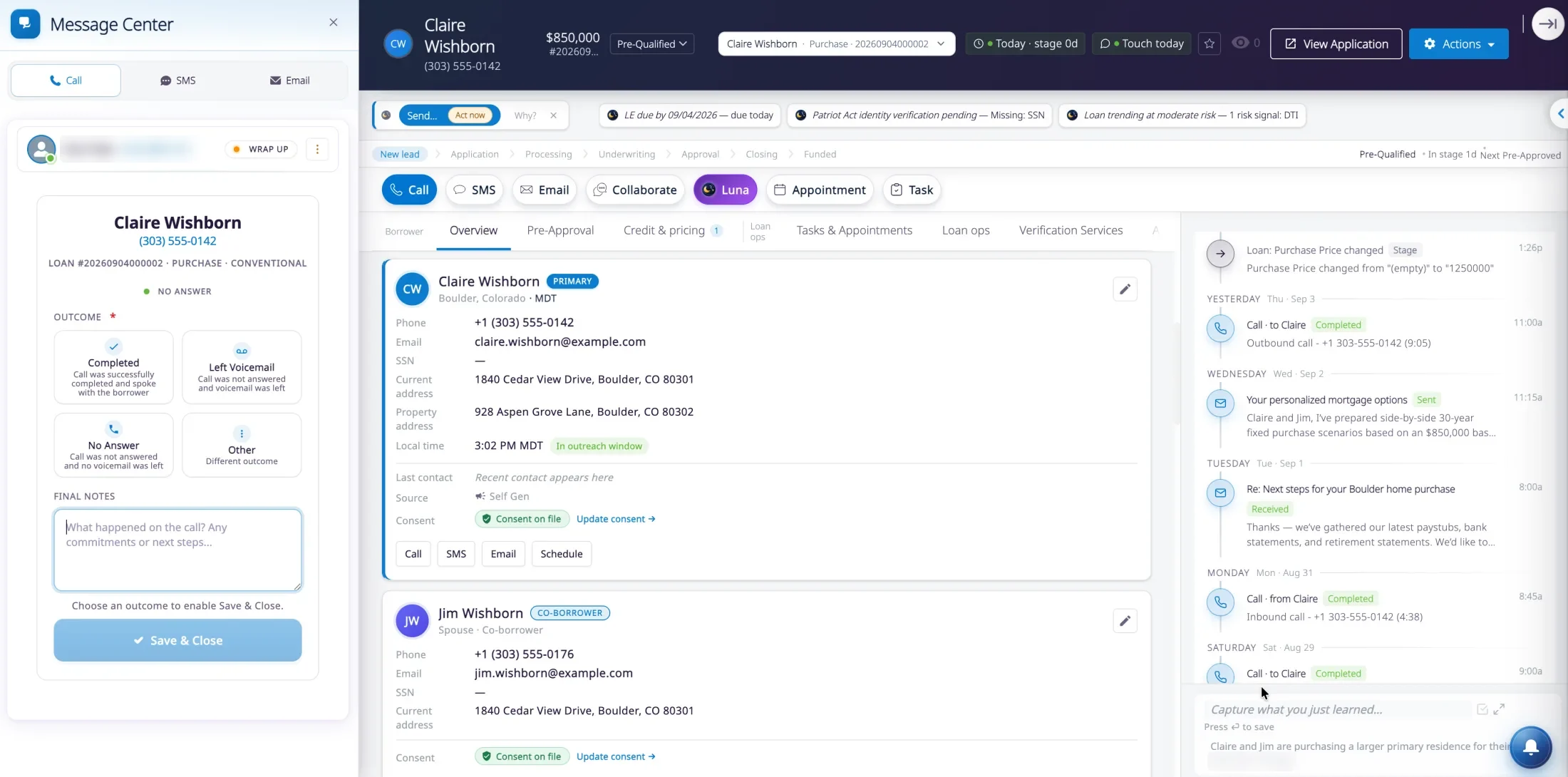
What is in it
Every channel a loan team uses
Each channel is part of the product, not a connector to someone else’s. That is why each one can write to the same timeline.
Voice
Live todayCall from the loan
Place and receive calls in the browser. An incoming call finds the borrower and opens their loan, and the call is logged when you hang up.Call recording
Rolling outRecordings you keep
Calls can be recorded where your policy calls for it. The audio is stored in an Amazon S3 bucket your company owns, and plays back from the loan’s timeline.Text
Live todayText one person or the whole deal
Text a borrower, or a group with the co-borrower and the agent. Send photos and files, use templates, and schedule a message for later. Opt-outs are honored automatically.Email
Live todayYour mailbox, on the loan
Loan officers connect their own Outlook mailbox. Email is sent and received beside the loan, with templates and signatures, and lands on the same timeline.Calendar
Live todayBook it without leaving the file
Scheduling reads Outlook calendars live. An appointment booked from the loan appears in Outlook, with a Teams meeting when you want one.Notifications
Live todayNothing slips past
A bell on every page opens a filterable inbox of what needs you. Urgent items, such as a disclosure deadline, pop up where you are working.Borrower chat
In previewChat from the Borrower Portal
Borrowers message their loan officer from the portal, and the conversation joins the same loan timeline as every call, text and email. Built and in preview; not yet switched on for lenders.

Luna Live
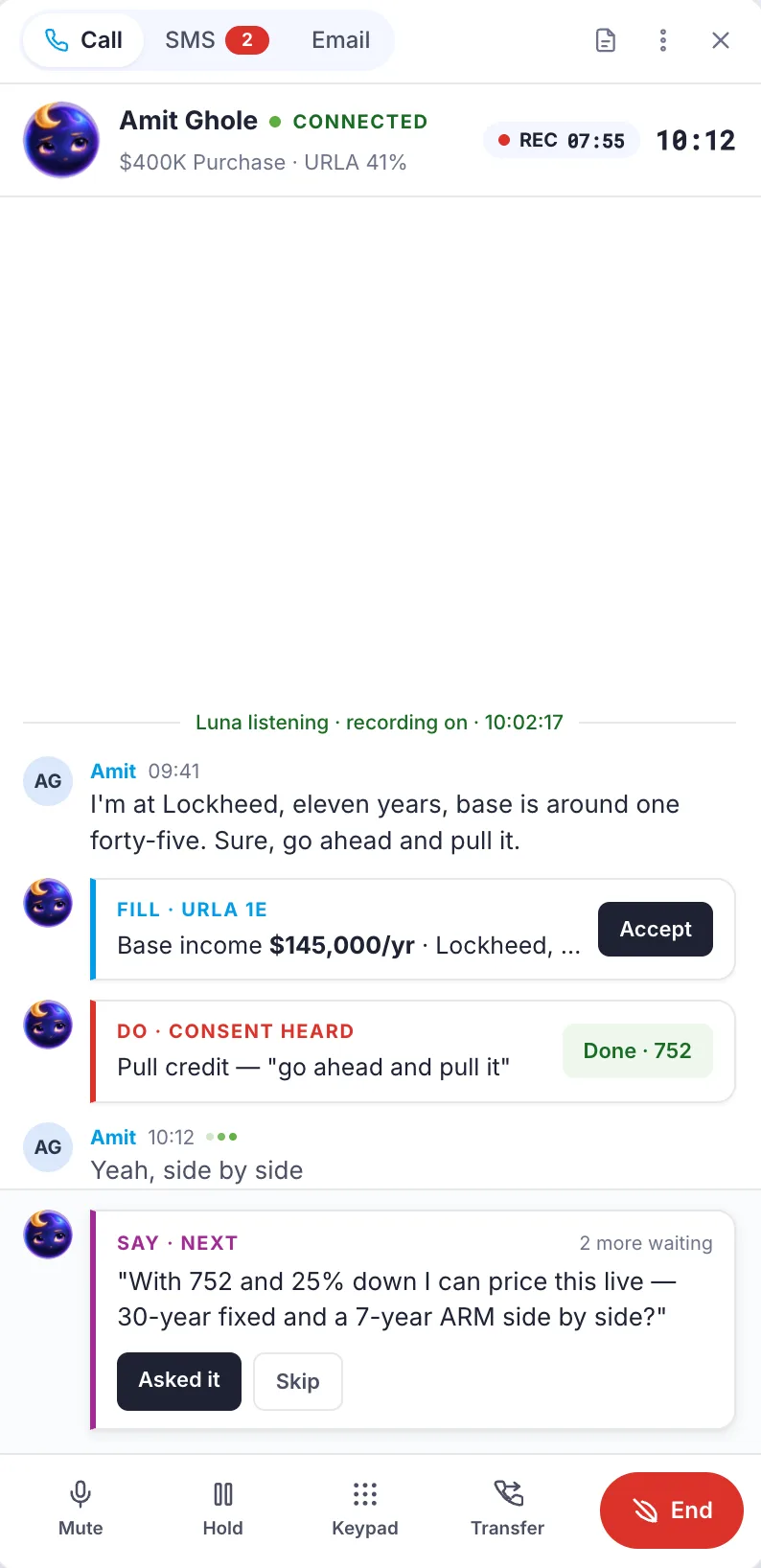
In previewBecause the call happens here, Luna AI can help during it.
With the borrower’s spoken consent on record, Luna AI listens to the call. It proposes entries for the application as the borrower talks, carries out a step the borrower agrees to, queues the next question, and writes the summary and next steps as the call ends.
A separate phone system could never do this. The conversation, the loan and the tools have to be in the same place.
Luna prepares. The loan officer decides.
Before and after
What changes for the team
Separate tools
Message Center
Tools
Separate toolsA phone system, a texting app, an inbox and a calendar, each with its own login.
Message CenterOne Message Center, docked on every screen.
The record
Separate toolsConversations live in personal phones and inboxes. The loan file shows none of it.
Message CenterEvery call, text and email is on the loan timeline for whoever opens the file next.
Consent
Separate toolsTracked in a spreadsheet, or not at all.
Message CenterConsent is recorded on the borrower, and opt-outs are enforced before a message is sent.
When someone leaves
Separate toolsThe relationship history leaves with their phone.
Message CenterThe history stays with the loan and with you.
Straight answers
About the Message Center
- Do our loan officers still need a separate dialer or texting app?
- No. Calling and texting are built into inflooens. Loan officers call and text from the loan, and every conversation is logged to it automatically.
- Which email and calendar does it work with?
- Microsoft Outlook. Loan officers connect their own Outlook mailbox, and scheduling reads Outlook calendars live, including Teams meetings.
- Where do the conversations go?
- Onto the loan timeline, in your own Salesforce org. Anyone with access to the loan sees the same history of calls, texts and emails.
- How is consent handled?
- Consent to contact is recorded on the borrower, and opt-outs are enforced before a text or marketing email is sent. Luna Live asks for the borrower’s spoken consent before it listens to a call.
- Can AI help during a call?
- Luna Live, in preview, listens to a call with the borrower’s recorded consent, proposes application entries, and writes the summary and next steps as the call ends. The loan officer stays in charge.
Hear it on a live call.
Thirty minutes. We will place a call from a loan and show you where it lands.