Borrower Portal · point of sale
The point of sale that sits on the loan your team already works.
Borrowers apply, connect or upload their documents, review disclosures and follow their loan in one portal under your brand. What they enter is the loan record your loan officers and processors open, synced with your LOS.

For the borrower
One place to apply, verify, upload and check
A borrower should not have to type what a bank statement already says, or call to ask where the loan stands.
Start from a link, finish later
Borrowers start from your branded link or their own loan officer’s link, and can save and come back. The application is pre-filled with what the loan already knows.An application that largely fills itself
Borrowers connect a bank or payroll account, or upload documents that are read to fill in answers and checked for mistakes. Luna AI guides them through the rest.Verified as they go
With the borrower’s consent, income, employment, assets and identity are verified during the application, not chased afterwards.A full co-borrower flow
A co-borrower is invited or entered alongside. Each has their own details, consent and review, and each document lands on the right person.A pre-approval letter on their own
Borrowers get their pre-approval letter from the portal as a PDF, with a link they can share with their agent.Disclosures in the portal
Borrowers review the Loan Estimate, give eConsent and state their intent to proceed in the portal. Signing completes through Encompass.One hub after applying
Status, the next step, to-dos, documents, conditions and messages in one place. After submitting, the status reads the same everywhere.English and Spanish
The portal reads in English or Spanish, and pre-approval letters print in either.
On the borrower’s phone
The same application, in the borrower app
The portal works in a browser today. The borrower app opens the same application and the same loan: apply by form, by answering Luna’s questions or by scanning documents, then follow the loan and send what is asked for.
Rolling out The borrower mobile app.All three mobile apps
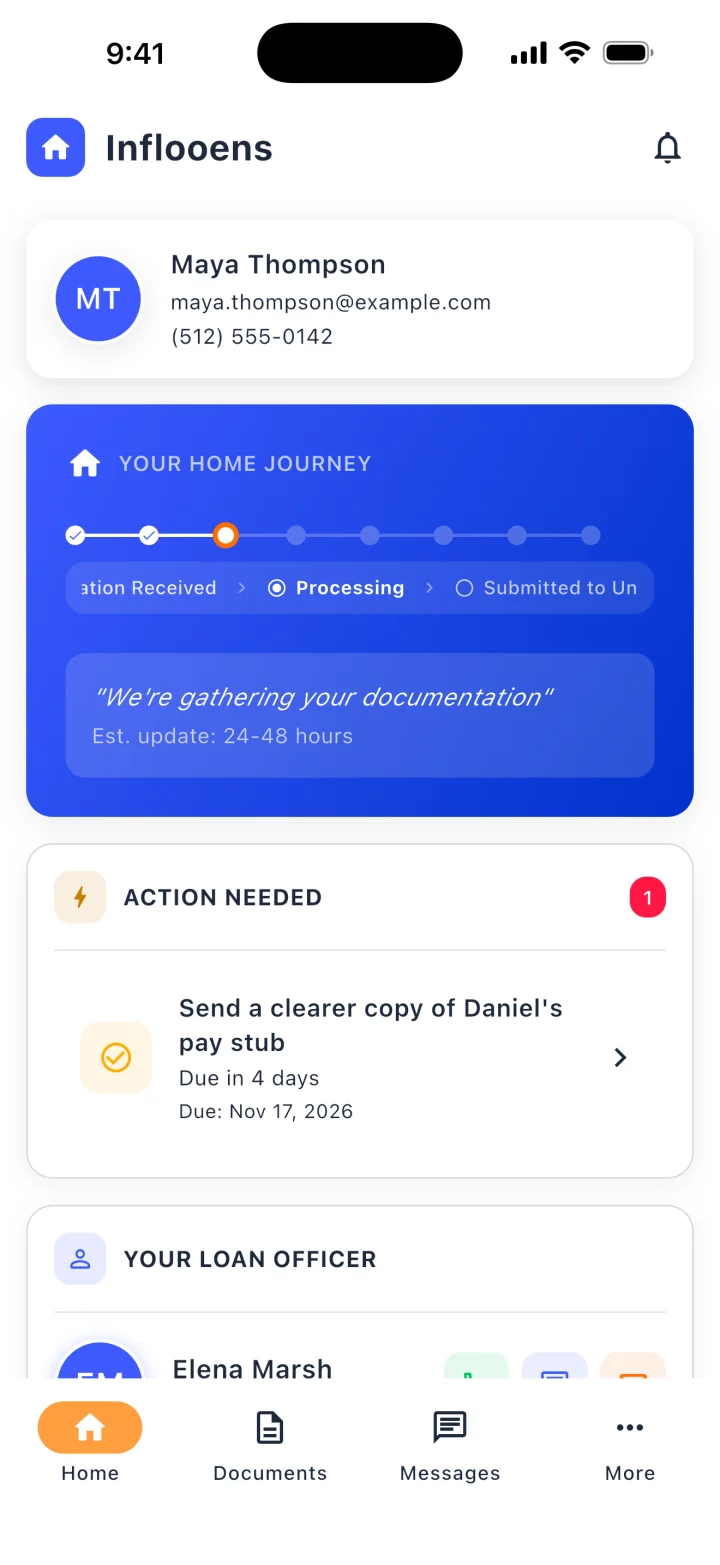
Home: where the loan stands, what is needed, and who to call 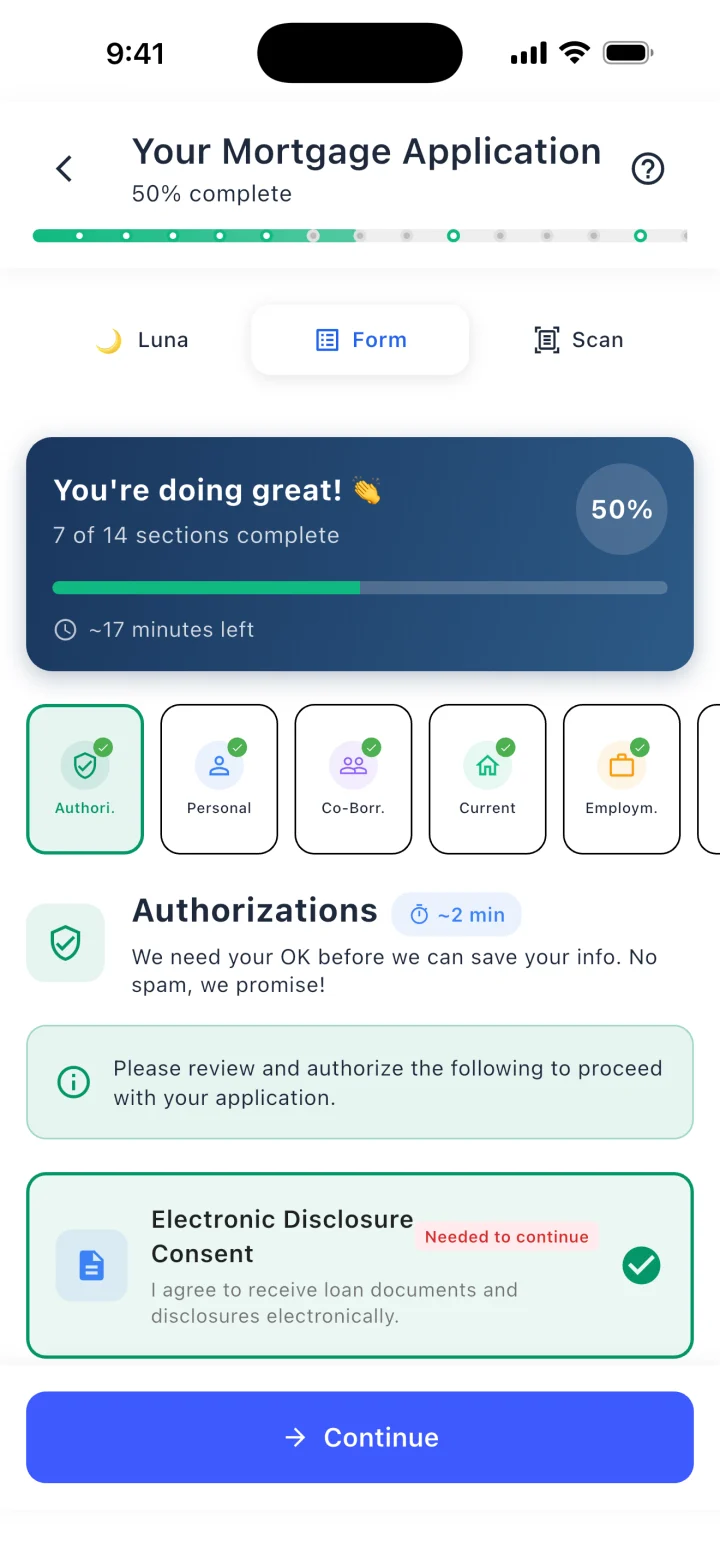
The application as a form, with Luna and Scan one tap away 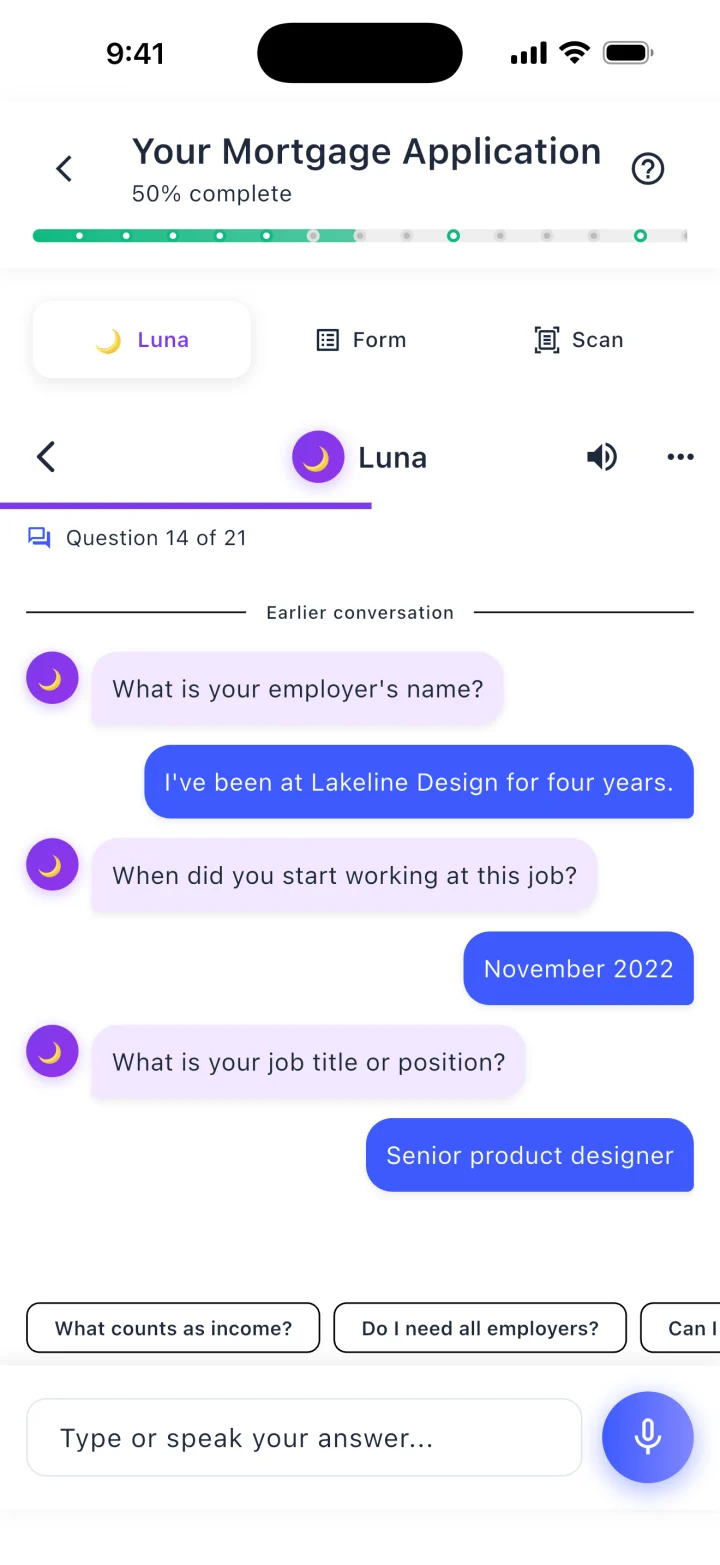
Or answer Luna’s questions, typed or spoken 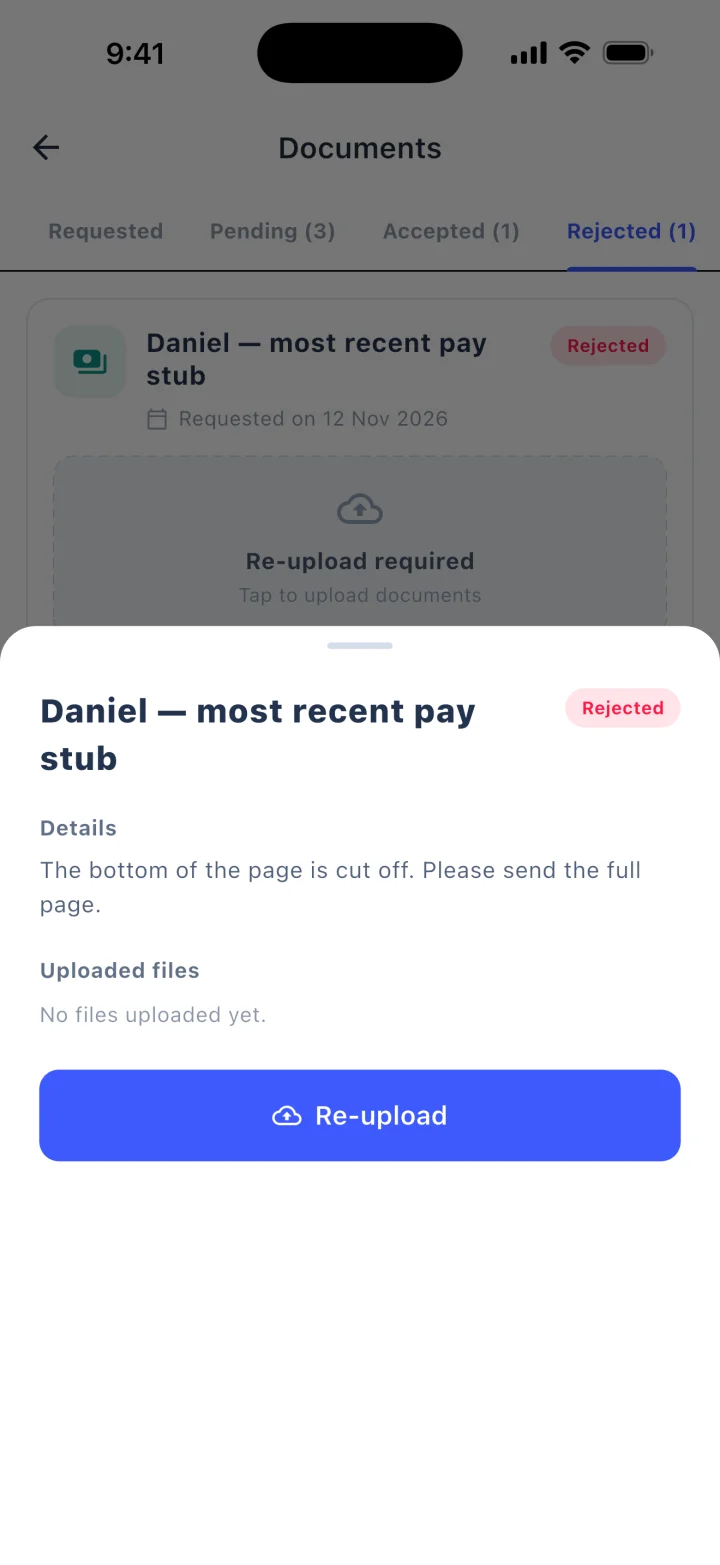
A document sent back, with the reason and a re-upload
Demo data, real screens
For the loan team
Nothing to re-key
A standalone point of sale hands its data to a CRM and then to the LOS. Here the application starts on the loan.
Loan officer
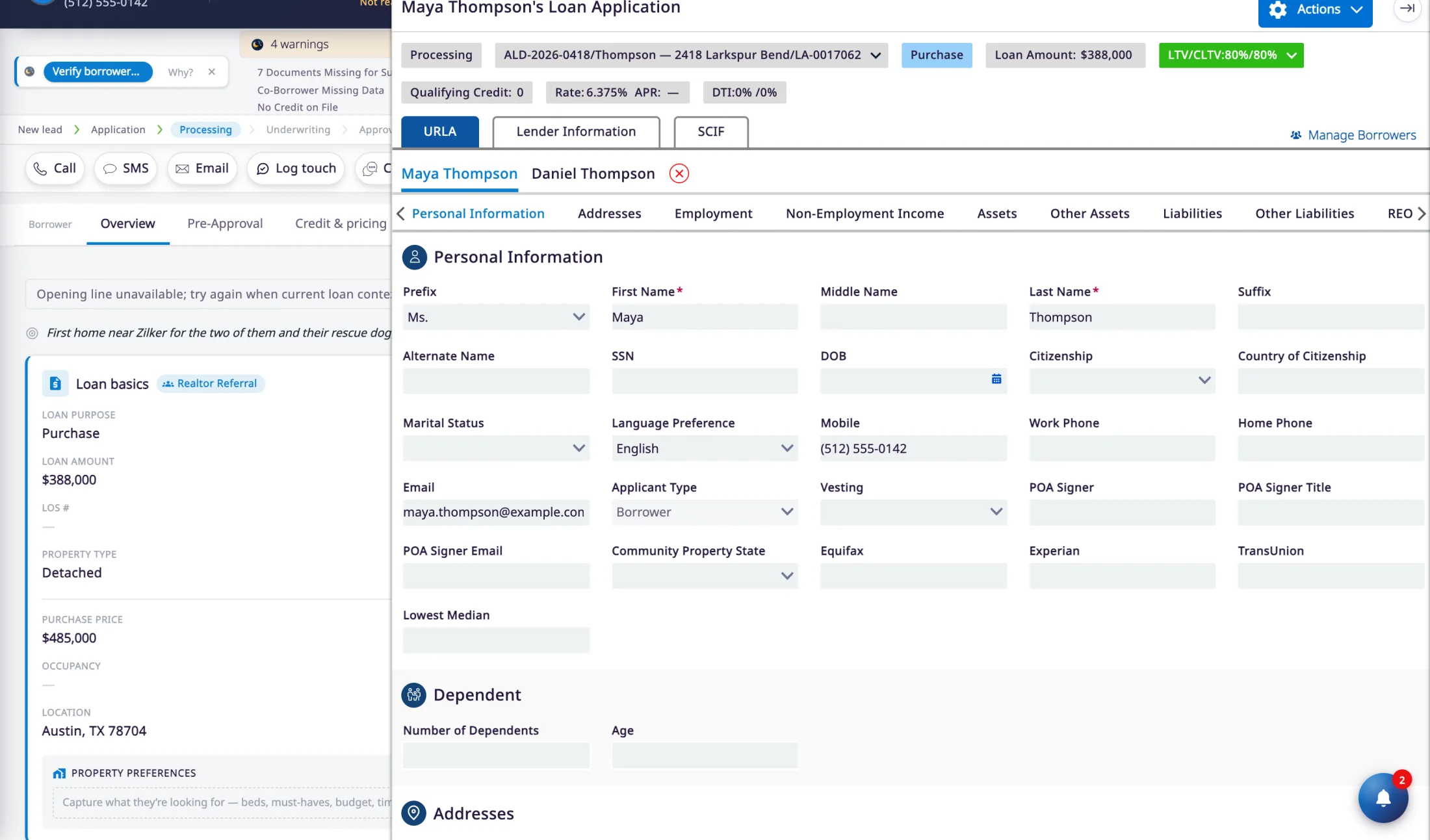
The application is already on the loan
What the borrower enters is the application the loan officer opens. Employment and income go in once.
From there the team pulls credit, prices the loan, runs DU and orders the Loan Estimate in the same workspace, with the borrower’s texts and calls on the timeline beside it.
Processor
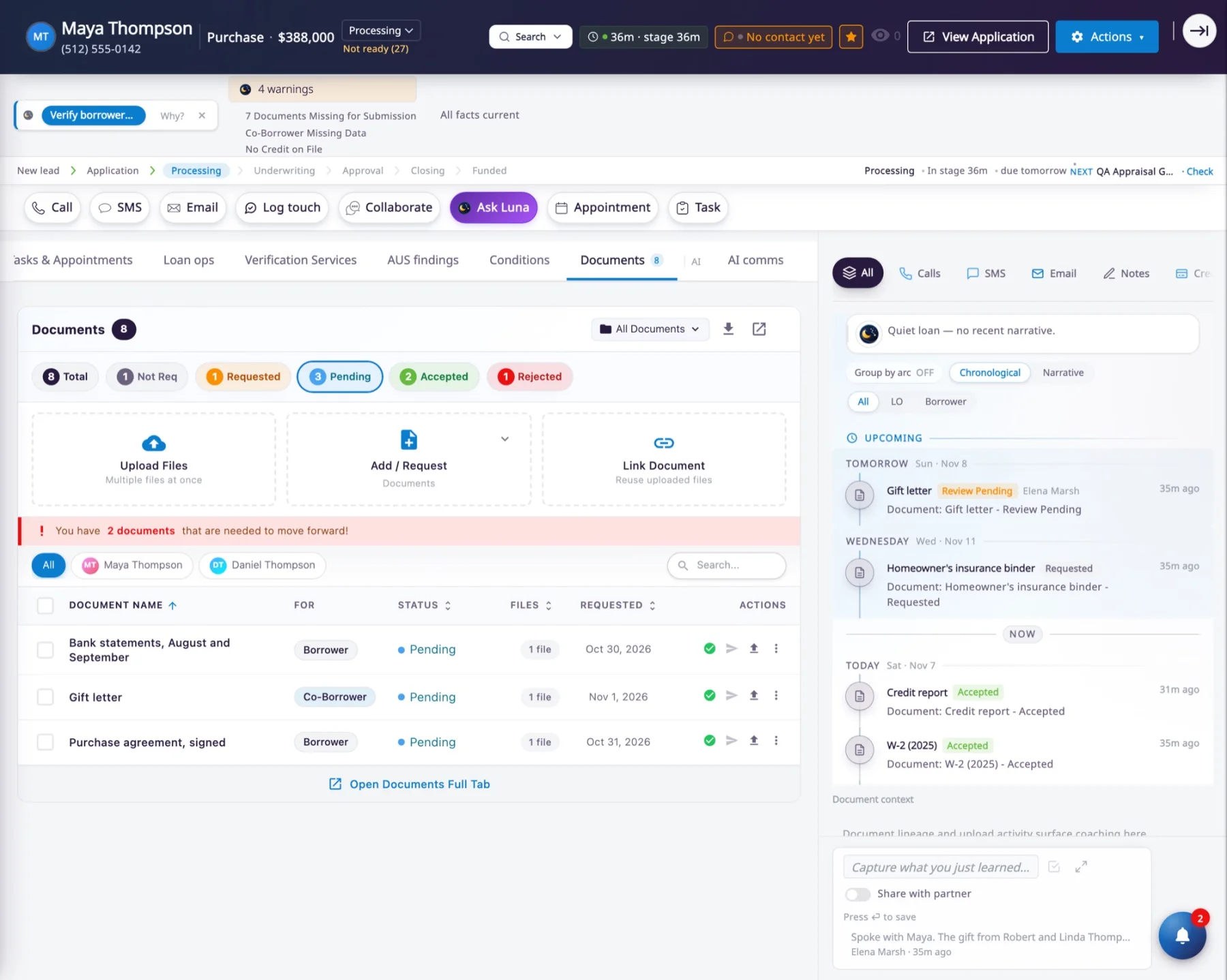
Uploads wait for a real review
Each borrower gets a personal upload link for what was requested. Uploads land on the loan’s Documents tab, wrong-looking files are flagged, and a rejected file goes back to the borrower with the reason.
With Encompass, the same review decision shows in both systems, so no file is reviewed twice.
Where it sits
From the borrower’s phone to your LOS
The Borrower Portal is the front door. The LOS is still the system of record. inflooens is the workspace between them.
1
The borrower applies
In a portal that carries your brand, alone or with a co-borrower, with accounts connected and documents read as they go.2
It lands on the loan record
The same record the loan officer opens. There is no import step and no second copy of the borrower.3
The team works the loan
Credit, pricing and rate locks, Fannie Mae DU, the Loan Estimate, conditions and messages, all from that loan.4
The LOS stays in step
The loan is created in the LOS at a real business event, such as a completed application. From then on, changes sync in near real time, in both directions.
Scope and limits
Where the portal stops
What it covers today, and the questions worth asking before you compare.
- Applications covered today are first-mortgage purchases and refinances. A home equity application is not available.
- Chat with the loan officer from the portal is in preview. Calls, texts and email are live.
- The borrower mobile app is rolling out by invitation. The portal works in a browser today.
- Sign-in through an online banking login, and connections to a core banking system, are not built today.
Questions to ask any vendor, with our answers
- How much of the application does the borrower complete here?
- The full URLA, pre-filled from what is already on the loan, with a co-borrower invited or entered alongside.
- Where does a finished application go?
- Nowhere. It is already on the loan record your team works. A completed application is one of the events that creates the loan in Encompass, and from then on the two stay in step.
- What happens to a document a borrower uploads?
- It waits as Pending until someone reviews it. The review is recorded in Encompass as well.
- Do we have to give up our current point of sale to try it?
- No. A pilot runs beside it, and you retire it when its renewal comes up and your team is ready.
Straight answers
Questions about the Borrower Portal
- Is the Borrower Portal a standalone mortgage POS?
- No. The Borrower Portal is the point of sale inside the inflooens Mortgage OS. The application a borrower completes is the same loan record the loan officer, the processor and the referral partner work, so there is no separate POS database to keep in sync.
- Does the Borrower Portal replace our LOS?
- No. Your LOS remains the compliance system of record. Encompass is live today, with near-real-time, two-way, field-level sync, and integrations with other leading LOS platforms are planned.
- Can a borrower and a co-borrower apply together?
- Yes. A co-borrower can be invited or entered alongside on the same application. Each has their own details, consent and review, and documents are uploaded against the person they belong to.
- How much does a borrower have to type?
- Less than on a plain form. The application is pre-filled from the loan record. Borrowers can connect a bank or payroll account, or upload documents that are read to fill in answers and checked for mistakes.
- Does the portal handle e-signatures?
- For disclosures. Borrowers review the Loan Estimate, give eConsent and state their intent to proceed in the portal, and signing completes through Encompass. General-purpose e-signature is not part of the portal today.
- Can borrowers use the portal in Spanish?
- Yes. Borrowers choose English or Spanish for the portal, and pre-approval letters print in either language.
See a borrower apply.
Thirty minutes. One application, followed from the portal to the loan.